Quick answer: A4 is 210 × 297 mm (8.27 × 11.69 in). US Letter is 216 × 279 mm (8.5 × 11 in). Letter is 5.9 mm wider and 17.6 mm shorter. Those 17.6 mm are why the bottom of your page disappears.
The world prints on two different sheets. Almost every country uses A4; the United States and Canada use Letter, and so does much of Latin America. Nobody notices until a file crosses a border and comes out of the printer missing its footer. This page has every size in both systems, the exact numbers, and the rule that makes a document print correctly on both.
Free printable
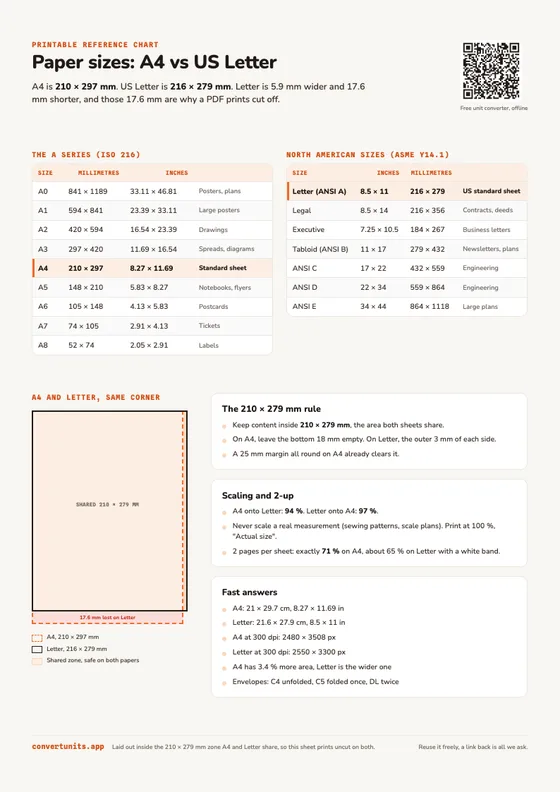
The whole chart on one page
Both size tables, the overlay diagram and the 210 × 279 mm rule. Laid out inside the zone A4 and Letter share, so it prints uncut on either paper.
Download the PDFOr carry every figure in your pocket:
A4 vs US Letter, side by side
| Measure | A4 | US Letter | Difference |
|---|---|---|---|
| Width | 210 mm | 215.9 mm | Letter +5.9 mm |
| Height | 297 mm | 279.4 mm | A4 +17.6 mm, the cut |
| In inches | 8.27 × 11.69 in | 8.5 × 11 in | the everyday pair |
| Area | 623.7 cm² | 603.2 cm² | A4 +3.4 % |
| Aspect ratio | 1.414 (√2) | 1.294 | A4 is narrower |
The A series, every size in mm and inches
The A sizes are set by ISO 216, the international standard for trimmed paper.
| Size | Millimetres | Inches | Typical use |
|---|---|---|---|
| A0 | 841 × 1189 | 33.11 × 46.81 | Posters, technical plans |
| A1 | 594 × 841 | 23.39 × 33.11 | Large posters, flip charts |
| A2 | 420 × 594 | 16.54 × 23.39 | Drawings, small posters |
| A3 | 297 × 420 | 11.69 × 16.54 | Spreadsheets, spreads, diagrams |
| A4 | 210 × 297 | 8.27 × 11.69 | The standard sheet, letters, CVs |
| A5 | 148 × 210 | 5.83 × 8.27 | Notebooks, flyers, programmes |
| A6 | 105 × 148 | 4.13 × 5.83 | Postcards, index cards |
| A7 | 74 × 105 | 2.91 × 4.13 | Tickets, loyalty cards |
| A8 | 52 × 74 | 2.05 × 2.91 | Labels, tags |
North American paper sizes
Letter is ANSI A in the ASME Y14.1 sheet size standard, which built its whole series on the 8.5 × 11 in sheet.
| Size | Inches | Millimetres | Typical use |
|---|---|---|---|
| Letter (ANSI A) | 8.5 × 11 | 216 × 279 | The standard US and Canadian sheet |
| Legal | 8.5 × 14 | 216 × 356 | Contracts, deeds, long forms |
| Executive | 7.25 × 10.5 | 184 × 267 | Business correspondence |
| Tabloid (ANSI B) | 11 × 17 | 279 × 432 | Newsletters, plans, 2-up Letter |
| ANSI C | 17 × 22 | 432 × 559 | Engineering drawings |
| ANSI D | 22 × 34 | 559 × 864 | Engineering drawings |
| ANSI E | 34 × 44 | 864 × 1118 | Large plans |
Feel free to reuse these charts or the PDF on your own site or in your documentation; a link back to this page is all we ask.
Why your PDF gets cut off, and the 210 × 279 mm rule
Lay the two sheets on top of each other and the area they share is 210 × 279 mm (8.27 × 11 in). A4 caps the width, Letter caps the height. Anything outside that rectangle is at risk the moment the file changes country.
Three symptoms, one cause:
- An A4 document printed on Letter loses about 18 mm at the bottom. Footers, page numbers and the last row of a table go first.
- A Letter document printed on A4 leaves an 18 mm white band at the bottom, and can run off the right edge if the margins were tight, because A4 is 6 mm narrower.
- Anything printed with “fit to page” keeps every element but changes the size of every element.
So the rule for a document that has to print correctly on both: keep the content inside 210 × 279 mm. In practice, leave the bottom 18 mm of an A4 page empty, and the outer 3 mm of each side of a Letter page. A 25 mm (1 in) margin all round on A4 already clears it, which is why plain business letters usually survive the crossing and dense tables do not.
Scaling: 94 % and 97 %
If the document is already written and you only need it printed, scale it:
- A4 content onto Letter: 94 %. 279.4 ÷ 297 = 0.9407, and the height is what binds.
- Letter content onto A4: 97 %. 210 ÷ 215.9 = 0.9727, this time the width binds.
Each leaves a slightly larger margin on the other axis, which nobody ever notices.
One exception, and it matters more than the rest of this page: never scale anything that carries a real measurement. Sewing patterns, knitting charts, PCB layouts, scale drawings, eye test charts. Print those at 100 % or “Actual size” and accept the clipping, or re-export them at the right paper size. A sewing pattern printed at 94 % produces a garment a full size too small, and you find out at the fitting.
The √2 rule, and 2-up printing
Every ISO 216 size shares one aspect ratio: 1:√2, about 1:1.414. Fold an A4 in half and you get an A5 with exactly the same proportions. A0 anchors the series at 841 × 1189 mm, almost exactly one square metre, and each size after it is the previous one halved. The idea goes back to DIN 476, published in 1922, the German standard the ISO series grew out of.
Letter has no such property. Its ratio is 11 ÷ 8.5 = 1.294, and half a Letter sheet is 8.5 × 5.5 in, ratio 1.545. Different shape.
This is why two pages per sheet works perfectly on A4 and never quite does on Letter. Two A4 pages on a landscape A4 sheet scale to exactly 71 % and fill it edge to edge. Two Letter pages on a landscape Letter sheet scale to about 65 % and leave a white band above and below. If you print handouts or booklets 2-up, that is the difference you actually see on the paper.
Set the default once and stop fighting it
- Microsoft Word: Layout > Size, pick your size, then Page Setup > Set As Default. Word follows your regional settings until you tell it otherwise.
- Google Docs: File > Page setup > Paper size, then “Set as default”.
- LaTeX: the default is Letter. Use
\documentclass[a4paper]{article}or the geometry package. - HTML to PDF (headless Chrome, WeasyPrint):
@page { size: A4; }orsize: letter;. - Acrobat and Preview: under Page Sizing & Handling, “Actual size” prints at 100 %, “Fit” is the option that quietly rescales.
Fast answers
- A4 in cm: 21 × 29.7 cm.
- A4 in inches: 8.27 × 11.69 in.
- US Letter in cm: 21.6 × 27.9 cm.
- Is A4 bigger than Letter? By area yes, about 3.4 % more, but Letter is the wider of the two.
- A4 in pixels: 2480 × 3508 px at 300 dpi, 1240 × 1754 px at 150 dpi.
- Letter in pixels: 2550 × 3300 px at 300 dpi.
- Envelopes: a C4 (229 × 324 mm) takes an unfolded A4, a C5 (162 × 229 mm) takes it folded once, a DL (110 × 220 mm) folded twice. The US equivalent is the #10 envelope (105 × 241 mm) for a Letter folded in three.
You print an A4 document on US Letter paper at actual size. What happens?
Letter is 17.6 mm shorter than A4, so the bottom of the page goes first. It is also 5.9 mm wider, so the sides are safe.
The app answers this kind of question in one tap.
Faster than looking up a chart
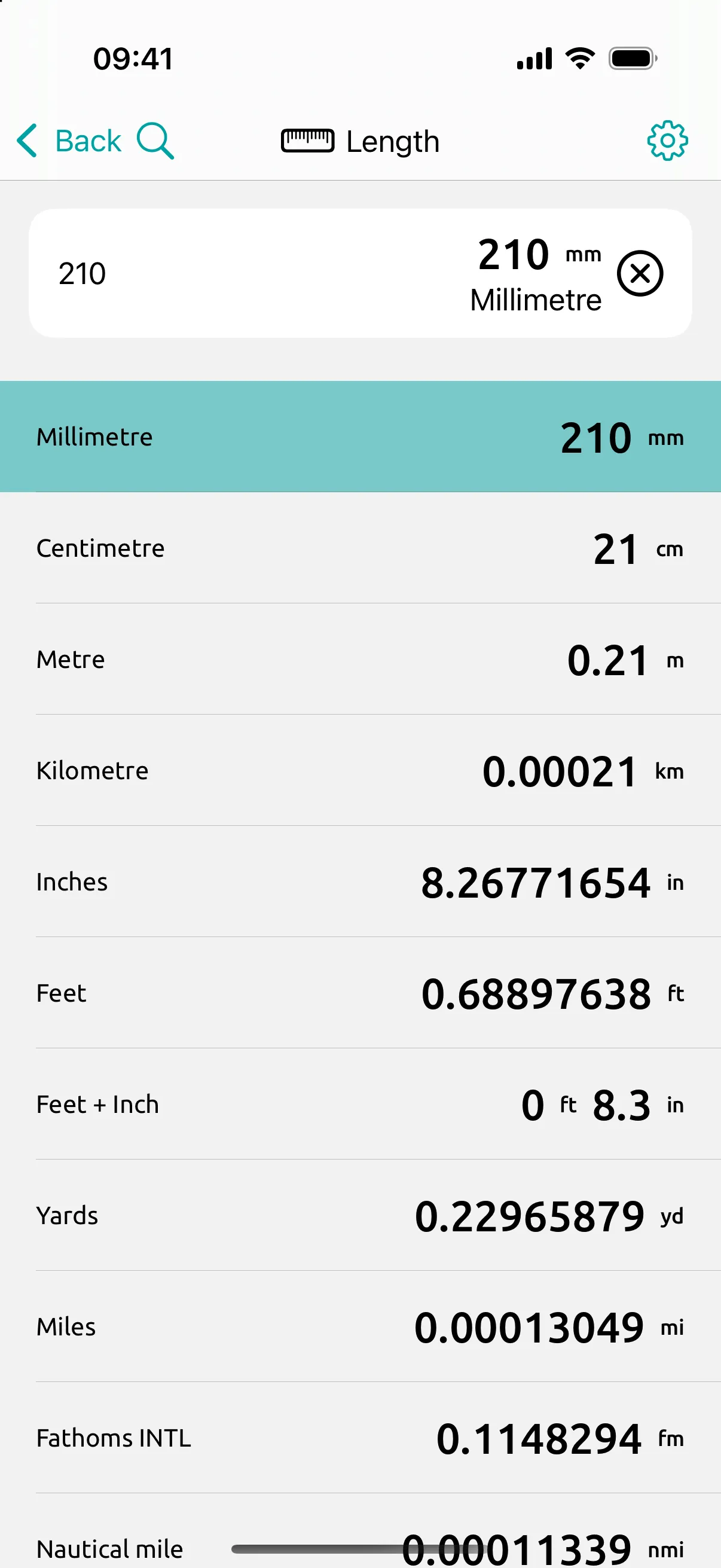
Paper sizes are really a millimetres and inches problem, and that one you carry in your pocket. Type 210 mm once into Conversion Calculator and read the inches straight away, offline, with the calculator built into the field so you can work out a margin without leaving the app. It is the same reflex as reading a screen size or a shelf, one of the everyday scenes the app was built around, right next to inches and centimetres.
Get the app free and stop guessing at margins. And if the chart deserves a spot above your printer, the PDF is here.